• Skip to main content
  • Skip to primary sidebar
  • Skip to footer

Microsoft Excel Tips and Tricks - Computergaga

  • Home
  • Excel Online Courses
  • Excel Functions List
  • Free Downloads
  • Blog
  • Tutorials
  • About
Home / Archives for Formulas

Count Unique Values in Excel

A common question from Excel analysts and enthusiasts on my courses is to count unique values in a list.

This post looks at using a formula to calculate this distinct count.

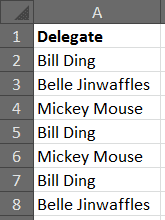
Consider the list below of a list of delegates attending our courses. A normal count on this range will tell us how many attendances there were. That’s good, but we want to know how many unique attendees there were.

List of names including duplicates
[Read more…] about Count Unique Values in Excel

Sum Every Nth Row in a List

At some point you may need to sum the value from every nth row in a large list. Excel does not provide a function for this. Excel has a few different Sum functions, but not one to sum the value from every other, or every third, fourth, or fifth row in a list.

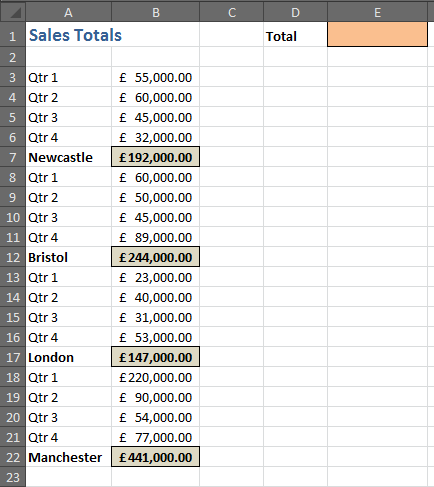
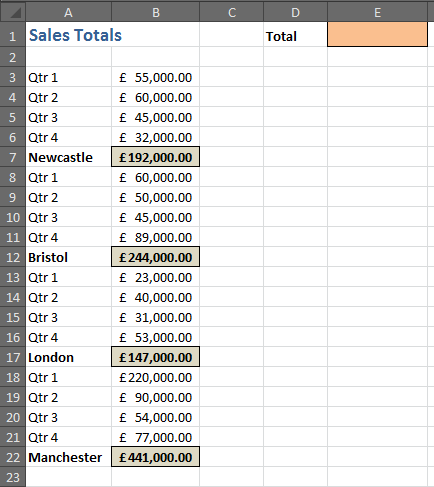
The spreadsheet below contains totals in every fifth row starting from row 3. We want to only add these sales totals.

List with sales totals to sum in every nth row
[Read more…] about Sum Every Nth Row in a List

Sum a Column Ignoring Formula Errors

Having formula errors on a spreadsheet can be bad news. They look ugly, they frighten the less Excel experienced among us and they stop our other formulas from working.

If you have formula errors on a spreadsheet it is normally best to stop it at its source. To either correct the error, or to hide it using formulas such as ISERROR and IFERROR.

However, if your spreadsheet is large, having these IFERROR functions in every cell to protect against error values will add more calculation time to your spreadsheet.

There is a function in Excel called AGGREGATE which allows us to perform various functions on a range whilst ignoring formula errors.

[Read more…] about Sum a Column Ignoring Formula Errors

Hide Formulas in Excel

Your spreadsheet formulas are always shown in the Formula Bar of Excel. This makes it easy to view and edit the formulas of a spreadsheet. How do you hide formulas in Excel?

If you do not want others to be able to view the formulas. Hide formulas in the Formula Bar by setting them to hidden and applying worksheet protection.

Before you apply worksheet protection, you need to change the property of the cells that contain the formulas to hidden.

[Read more…] about Hide Formulas in Excel

Excel HYPERLINK Function

The Excel HYPERLINK function creates hyperlinks to to other sheets, webpages or files such as PDF’s on your Excel spreadsheet.

The real power behind this function is that it can be used to create dynamic hyperlinks that are dependent upon cell values or results from formulas.

We can create conditional hyperlinks by nesting them within an IF function, or create hyperlinks that can find the address to link to themselves by embedding lookup or text functions within them. This helps us to create automated and error resistant spreadsheets.

[Read more…] about Excel HYPERLINK Function
  • « Go to Previous Page
  • Page 1
  • Interim pages omitted …
  • Page 13
  • Page 14
  • Page 15
  • Page 16
  • Page 17
  • Interim pages omitted …
  • Page 20
  • Go to Next Page »

Primary Sidebar

Recent Posts

  • TEXTSPLIT in Excel: 9 Practical Examples You Can Use Today
  • Create Custom In-Cell Bar Charts in Excel
  • Excel SWITCH Function – Nested IF Function Alternative
  • Sum Formulas Only in Excel
  • How to Calculate Age in Excel
Advanced Excel Success book

Footer

Contact

[email protected]

LinkedIn Twitter YouTube

Useful Links

  • Home
  • Excel Online Courses
  • Tutorials
  • Sitemap
  • Privacy Policy
  • Jobs by Jooble

Course Topics

  • Blog
  • Charts
  • Courses
  • Dashboards
  • Downloads
  • Excel Tips
  • Formulas
  • Mail Merge
  • Office
  • PivotTables
  • Power BI
  • Power Pivot
  • Power Query
  • VBA

Join Our Mailing List

© Copyright 2009 Computergaga · All Rights Reserved ·