• Skip to main content
  • Skip to primary sidebar
  • Skip to footer

Microsoft Excel Tips and Tricks - Computergaga

  • Home
  • Excel Online Courses
  • Excel Functions List
  • Free Downloads
  • Blog
  • Tutorials
  • About
Home / Archives for Formulas

Excel Formula to Find the Least Frequent Value

This tutorial explains an Excel formula to find the least frequent value in a list. This formula will work whether the value is a number, or text. In this example we want to return the name that occurs the least.

The spreadsheet below shows a list of names with the answer in cell D2. Ross is the name that occurs the least in that list.
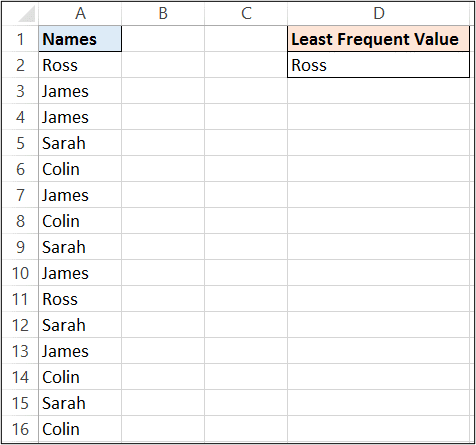
Return the least frequent value in a list

This formula returns the least frequent value from the list in A2:A16. The formula is explained below so keep reading.

{=INDEX(A2:A16,MATCH(MIN(COUNTIF(A2:A16,A2:A16)),COUNTIF(A2:A16,A2:A16),0))}
[Read more…] about Excel Formula to Find the Least Frequent Value

Count How Many Fridays Between Two Dates

You may need to count the occurrences of a specific weekday between two dates in Excel. For example, how many Fridays between two dates.

There is no real standalone function in Excel to do this, but it can be done. This could be a useful formula to find how many payments, or how many meetings until an end date.

How Many Fridays Until a Specific Date – Excel Formula

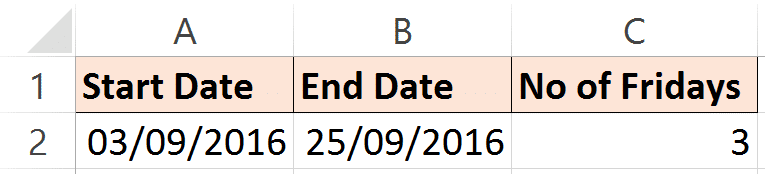
The formula below compares the dates in cells A2 and B2 and returns the the number of Fridays between them. The formula is explained below.

=B2-A2-NETWORKDAYS.INTL(A2,B2,16)+1
Calculating the number of Fridays between two dates

In this formula, the start date is subtracted from the end date. This leaves us with how many days in total between the two dates.

In the second half of the formula, the NETWORKDAYS.INTL function is used to calculate the difference between the two dates excluding Fridays. This is then subtracted from the current total to leave us with how many Fridays there are.

The 16 in the function specifies to exclude the Fridays. When typing the function a list appears asking which days to exclude in the weekend argument.

The +1 is added to the end because the NETWORKDAYS.INTL function calculates whole workdays. For example, you may consider the difference in days between today and tomorrow to be 1 day. NETWORKDAYS.INTL would return that answer as 2 as it uses each day as a whole day. So the +1 is added to counteract that.

[Read more…] about Count How Many Fridays Between Two Dates

Excel Formula to Display the Sheet Name in Cell

This blog post looks at using an Excel formula to display the sheet name in cell. By finding the sheet name using an Excel formula, it ensures that if the sheet name is changed, the formula returns the new sheet tab name.

This tutorial covers two Excel formula examples. Firstly, using the CELL, MID and FIND functions. And then using the TEXTAFTER function with CELL.

Let’s begin by looking at the CELL function.

[Read more…] about Excel Formula to Display the Sheet Name in Cell

VLOOKUP for the Last Match in Excel

VLOOKUP is an awesome Excel function. One of its limitations is that it can only return the first match from a list. In this tutorial, we will see how to use VLOOKUP for the last match in Excel.

VLOOKUP is typically used to look for a unique value. But what about when the value you are looking for appears multiple times in the list, and you want to return the last match.

Sure we could sort the list so that the last match would become the first, but this is not always an option.

This tutorial uses VLOOKUP for the last match. The formula used can be adapted to find the 2nd or 3rd match, if required.

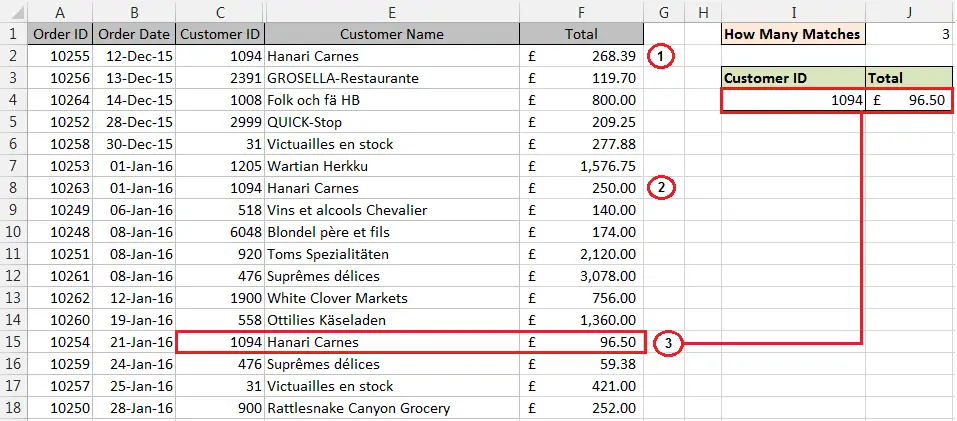
VLOOKUP for the last match in  a list
[Read more…] about VLOOKUP for the Last Match in Excel

Extract the Domain from a List of URL’s

If you are responsible for analysing a list of URL’s in Excel, then you may need to extract the domain from each URL. After extracting the domain you can perform useful reporting tasks such as grouping the domains, or counting the number of unique domains in the list.

This can be quite a difficult task especially if the URL’s are not consistent. In this article we explore a few different approaches to extract the domain from a URL. The method you choose will depend on the appearance of the URL’s in the list and the format you would like to extract the domain in.

This article covers;

  1. Extract the domain including the URL protocol.
  2. Extract the domain ignoring URL protocol.
  3. Extract the domain without the www.
  4. Extract root URL’s that don’t end with a slash (/).
  5. Using helper columns to break up complex formulae.
[Read more…] about Extract the Domain from a List of URL’s
  • « Go to Previous Page
  • Page 1
  • Interim pages omitted …
  • Page 11
  • Page 12
  • Page 13
  • Page 14
  • Page 15
  • Interim pages omitted …
  • Page 20
  • Go to Next Page »

Primary Sidebar

Recent Posts

  • Why XLOOKUP Returns #N/A (And How to Fix It)
  • Highlight Rows when Value Changes – Excel Conditional Formatting
  • TEXTSPLIT in Excel: 9 Practical Examples You Can Use Today
  • Create Custom In-Cell Bar Charts in Excel
  • Excel SWITCH Function – Nested IF Function Alternative
Advanced Excel Success book

Footer

Contact

[email protected]

LinkedIn Twitter YouTube

Useful Links

  • Home
  • Excel Online Courses
  • Tutorials
  • Sitemap
  • Privacy Policy
  • Jobs by Jooble

Course Topics

  • Blog
  • Charts
  • Courses
  • Dashboards
  • Downloads
  • Excel Tips
  • Formulas
  • Mail Merge
  • Office
  • PivotTables
  • Power BI
  • Power Pivot
  • Power Query
  • VBA

Join Our Mailing List

© Copyright 2009 Computergaga · All Rights Reserved ·