• Skip to main content
  • Skip to primary sidebar
  • Skip to footer

Microsoft Excel Tips and Tricks - Computergaga

  • Home
  • Excel Online Courses
  • Excel Functions List
  • Free Downloads
  • Blog
  • Tutorials
  • About
Home / Archives for Formulas

Interactive Checklist in Excel

In this blog post, we look at creating an interactive checklist in Excel. The checklist will automatically mark the items in a list when they are checked.

To do this we will first need to insert checkboxes onto the spreadsheet, we then need to be able to highlight an item when it is completed.

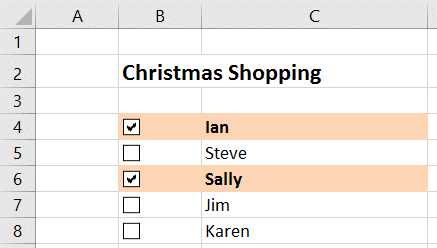
In this tutorial, I am using the idea of a Christmas shopping list of names (shown below). Your checklist could however be for any list of tasks, inventory or products.

Interactive checklist in Excel
[Read more…] about Interactive Checklist in Excel

Excel Formula to Extract Postcode from an Address

I was asked recently in class how to extract a postcode from an address in the UK. The person asking needed a formula because the spreadsheet updates often and they wanted an automated solution.

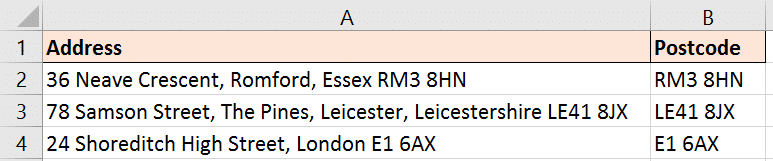
The problem with extracting UK postcodes is that they are highly irregular. They will be at the end of the full address and can come in a different number of characters e.g. E1 6AX, RM3 8HN and LE41 8JX.

They are not as structured as a US zip code may be and harder to extract. Because of this the formula is intense, but I am going to break it down and explain it in detail.

Extract postcode from an address with an Excel formula
[Read more…] about Excel Formula to Extract Postcode from an Address

Display a Symbol Conditionally using the IF Function

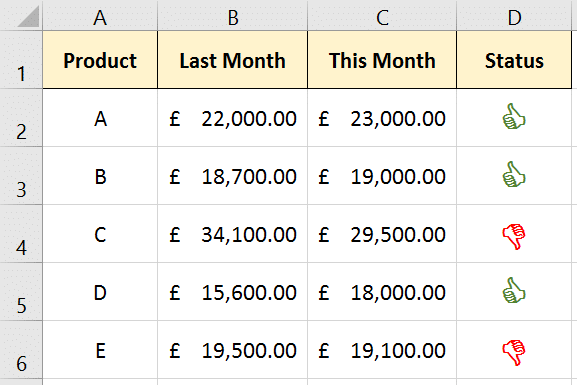
This blog post looks at using the IF function to display a symbol conditionally in a cell. In the image below a thumbs up or thumbs down symbol is shown dependent upon whether the sale of products have improved since last month.

This tutorial will show you how to display any symbol though, so you could insert a smiley face, hour glass, aeroplane and much more.

Thumbs up symbol shown dependent upon a condition
[Read more…] about Display a Symbol Conditionally using the IF Function

Excel Formula to Find the Least Frequent Value

This tutorial explains an Excel formula to find the least frequent value in a list. This formula will work whether the value is a number, or text. In this example we want to return the name that occurs the least.

The spreadsheet below shows a list of names with the answer in cell D2. Ross is the name that occurs the least in that list.

Return the least frequent value in a list

This formula returns the least frequent value from the list in A2:A16. The formula is explained below so keep reading.

{=INDEX(A2:A16,MATCH(MIN(COUNTIF(A2:A16,A2:A16)),COUNTIF(A2:A16,A2:A16),0))}
[Read more…] about Excel Formula to Find the Least Frequent Value

Count How Many Fridays Between Two Dates

You may need to count the occurrences of a specific weekday between two dates in Excel. For example, how many Fridays between two dates.

There is no real standalone function in Excel to do this, but it can be done. This could be a useful formula to find how many payments, or how many meetings until an end date.

How Many Fridays Until a Specific Date – Excel Formula

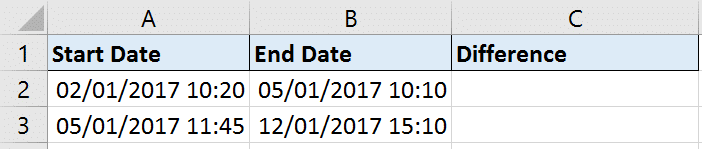
The formula below compares the dates in cells A2 and B2 and returns the the number of Fridays between them. The formula is explained below.

=B2-A2-NETWORKDAYS.INTL(A2,B2,16)+1
Calculating the number of Fridays between two dates

In this formula, the start date is subtracted from the end date. This leaves us with how many days in total between the two dates.

In the second half of the formula, the NETWORKDAYS.INTL function is used to calculate the difference between the two dates excluding Fridays. This is then subtracted from the current total to leave us with how many Fridays there are.

The 16 in the function specifies to exclude the Fridays. When typing the function a list appears asking which days to exclude in the weekend argument.

The +1 is added to the end because the NETWORKDAYS.INTL function calculates whole workdays. For example, you may consider the difference in days between today and tomorrow to be 1 day. NETWORKDAYS.INTL would return that answer as 2 as it uses each day as a whole day. So the +1 is added to counteract that.

[Read more…] about Count How Many Fridays Between Two Dates
  • « Go to Previous Page
  • Page 1
  • Interim pages omitted …
  • Page 10
  • Page 11
  • Page 12
  • Page 13
  • Page 14
  • Interim pages omitted …
  • Page 20
  • Go to Next Page »

Primary Sidebar

Recent Posts

  • TEXTSPLIT in Excel: 9 Practical Examples You Can Use Today
  • Create Custom In-Cell Bar Charts in Excel
  • Excel SWITCH Function – Nested IF Function Alternative
  • Sum Formulas Only in Excel
  • How to Calculate Age in Excel
Advanced Excel Success book

Footer

Contact

[email protected]

LinkedIn Twitter YouTube

Useful Links

  • Home
  • Excel Online Courses
  • Tutorials
  • Sitemap
  • Privacy Policy
  • Jobs by Jooble

Course Topics

  • Blog
  • Charts
  • Courses
  • Dashboards
  • Downloads
  • Excel Tips
  • Formulas
  • Mail Merge
  • Office
  • PivotTables
  • Power BI
  • Power Pivot
  • Power Query
  • VBA

Join Our Mailing List

© Copyright 2009 Computergaga · All Rights Reserved ·