• Skip to main content
  • Skip to primary sidebar
  • Skip to footer

Microsoft Excel Tips and Tricks - Computergaga

  • Home
  • Excel Online Courses
  • Excel Functions List
  • Free Downloads
  • Blog
  • Tutorials
  • About
Home / Excel Tips / Find the Weekday of a Date in Excel

Find the Weekday of a Date in Excel

When you enter a date into Excel, Excel will format it using its default date format. Excel provides plenty of alternative date formats for you to choose such as 14.03.01 and 14 March 2001.

We want to use a format that will tell us the weekday of the date, whether it is a Monday, Tuesday etc.

Formatting the Date

Type a date into a cell of the spreadsheet. This can be any date you want post 01/01/1900. It can be the date you were born, date you were married, or the date the 2012 Olympics starts. For this example, I will use Christmas day 2001

  1. Select the cell where the date was entered
  2. Open the Format Cells dialogue box. In Excel 2003 click Format > Cells, or in Excel 2007 click the dialogue box launcher arrow in the corner of the Number group of the Home tab. You could also press Ctrl + 1
  3. Select the Number tab, if necessary
  4. Select Custom from the Category: list
  5. In the Type: box, replace its contents with dddd
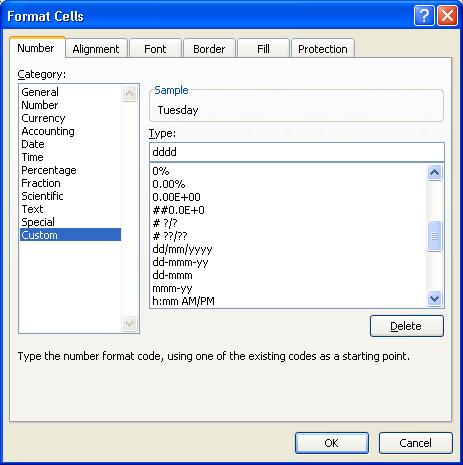
Format the date to show a weekday
  1. Click Ok

The weekday is now visible in the cell. Notice how the Formula Bar still displays the date as 25/12/2001. Formatting cells changes the appearance of the value, but the cell still contains the original value.
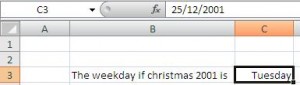
Original date value retained after formatting

Related Posts:

  • Calculate age in Excel thumbnail
    How to Calculate Age in Excel
  • Sum formulas only in Excel
    Sum Formulas Only in Excel
  • Compare dates in Excel feature
    How to Compare Dates in Excel
  • SWITCH function feature
    Excel SWITCH Function - Nested IF Function Alternative

Reader Interactions

Leave a Reply Cancel reply

Your email address will not be published. Required fields are marked *

Primary Sidebar

Recent Posts

  • Excel SWITCH Function – Nested IF Function Alternative
  • Sum Formulas Only in Excel
  • How to Calculate Age in Excel
  • Custom Sort in Excel
  • Case Sensitive Lookup with XLOOKUP in Excel
Advanced Excel Success book

Footer

Contact

[email protected]

LinkedIn Twitter YouTube

Useful Links

  • Home
  • Excel Online Courses
  • Tutorials
  • Sitemap
  • Privacy Policy
  • Jobs by Jooble

Course Topics

  • Blog
  • Charts
  • Courses
  • Dashboards
  • Downloads
  • Excel Tips
  • Formulas
  • Mail Merge
  • Office
  • PivotTables
  • Power BI
  • Power Pivot
  • Power Query
  • VBA

Join Our Mailing List

© Copyright 2009 Computergaga · All Rights Reserved ·