The Excel REPT function is used to repeat text a given number of times in a cell.
The syntax for the REPT function is:
=REPT(text,number_times)
| Argument | Purpose |
|---|---|
| Text | The text you want to repeat |
| Number_times | The number of times you want to repeat the text |
The examples below show the REPT function being used to repeat text.
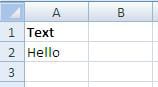
| Function | Result |
|---|---|
| =REPT(A1,2) | HelloHello |
| =REPT(“|”,5) | ||||| |
| =REPT(“&”,3) | &&& |


