• Skip to main content
  • Skip to primary sidebar
  • Skip to footer

Microsoft Excel Tips and Tricks - Computergaga

  • Home
  • Excel Online Courses
  • Excel Functions List
  • Free Downloads
  • Blog
  • Tutorials
  • About
Home / Archives for Formulas

5 Reasons Why your Excel Formula is Not Calculating

When your Excel formula is not calculating, or not updating, it can be very frustrating. Your formulas are the driving force for your spreadsheet.

There are 5 reasons for your Excel formula not calculating. In this tutorial we explain these 5 scenarios.
Watch the Video – Excel Formula Not Calculating

[Read more…] about 5 Reasons Why your Excel Formula is Not Calculating

4 Ways to Group Time in Excel – PivotTables and Formulas

If your spreadsheet contains a list of times, it is useful to group time in Excel into intervals such as 30 minutes, hourly or every 6 hours.

Fortunately, Excel provides a variety of methods to group time depending on what you need. In this blog post, we look at 4 ways to group time in Excel using PivotTables and formulas.

[Read more…] about 4 Ways to Group Time in Excel – PivotTables and Formulas

Excel MOD Function – 4 Examples

The Excel MOD function is used to return the remainder after one number is divided by another. Simple, but there are some very useful examples of the MOD function.

In this blog post, we explore 4 Excel MOD function examples. Hopefully this will help to see how versatile this function can be.

To start we better have a quick introduction to how to use the MOD function. It looks like this;

=MOD(number, divisor)

You need to provide it first with the number you want to divide, and then the number you want to divide it by (divisor).

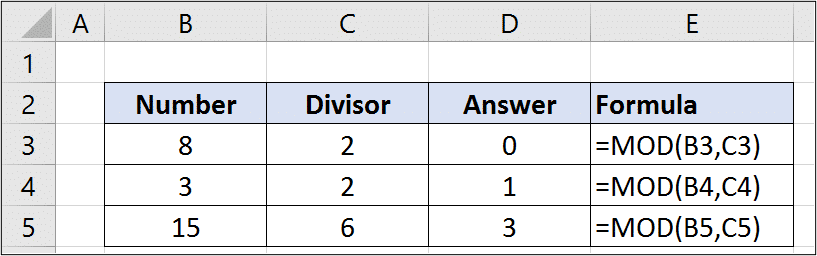
You can see some basic examples of this below.

Basic examples of the MOD function in Excel

Ok, lets get on with some more impressive real-world Excel MOD function examples.

[Read more…] about Excel MOD Function – 4 Examples

Highlight the Cells that Contain a Specific Word (and it Matches Case)

In this blog post, we look at how to highlight the cells that contain a specific word. We will also ensure that the word in the cell matches the case of the word being looked for.

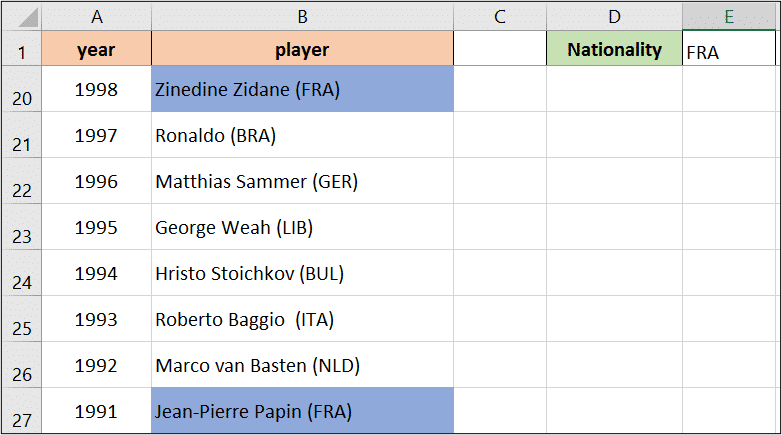
For this example, we have a list of the Ballon d’or winners of all time. Column B contains 3 letters in uppercase (after the name) which identify the country that the player represented at the time of winning the award.

In cell E1 I have entered the 3 digits for a country. I would like to automatically change the colour of all the cells that contain the country written in E1.

Highlight cells that contain a specific word

There is a good chance that the 3 digits identifying a country could also occur in a players name. For example, the letters for France – FRA do occur in the name Franz Beckenbauer.

To prevent this happening, we will match the case of the word we are searching for, as it is always written in upper case.

[Read more…] about Highlight the Cells that Contain a Specific Word (and it Matches Case)

4 Excel VLOOKUP Examples – Why Use the VLOOKUP Function

When learning the VLOOKUP function, one of the things people can struggle with is seeing why this function is so useful. In this blog post, we look at 4 Excel VLOOKUP examples.

The purpose of VLOOKUP is to look for a value and return some information about that value. Although quite specific in its role, this function can be used in some very clever and interesting ways.

For anyone reading this who may be quite new to VLOOKUP, lets have a quick look at its structure.

=VLOOKUP(lookup_value, table_array, col_index_num, [range_lookup])
  • Lookup Value – The value you want to look for.
  • Table Array – The table containing the value to look for and value to return.
  • Col Index Num – The column number of the Table Array containing the value to return.
  • Range Lookup – Optional argument. To specify whether an approximate or exact match on the Lookup Value is needed.

For more information on how to use VLOOKUP, check out the Ultimate VLOOKUP guide.

Watch the Video – Excel VLOOKUP Examples

If you would prefer to watch the video, or simply watch it whilst you refer to the formulas in this tutorial. You can do so below.

[Read more…] about 4 Excel VLOOKUP Examples – Why Use the VLOOKUP Function
  • « Go to Previous Page
  • Page 1
  • Interim pages omitted …
  • Page 7
  • Page 8
  • Page 9
  • Page 10
  • Page 11
  • Interim pages omitted …
  • Page 19
  • Go to Next Page »

Primary Sidebar

Recent Posts

  • Excel SWITCH Function – Nested IF Function Alternative
  • Sum Formulas Only in Excel
  • How to Calculate Age in Excel
  • Custom Sort in Excel
  • Case Sensitive Lookup with XLOOKUP in Excel
Advanced Excel Success book

Footer

Contact

[email protected]

LinkedIn Twitter YouTube

Useful Links

  • Home
  • Excel Online Courses
  • Tutorials
  • Sitemap
  • Privacy Policy
  • Jobs by Jooble

Course Topics

  • Blog
  • Charts
  • Courses
  • Dashboards
  • Downloads
  • Excel Tips
  • Formulas
  • Mail Merge
  • Office
  • PivotTables
  • Power BI
  • Power Pivot
  • Power Query
  • VBA

Join Our Mailing List

© Copyright 2009 Computergaga · All Rights Reserved ·


