• Skip to main content
  • Skip to primary sidebar
  • Skip to footer

Microsoft Excel Tips and Tricks - Computergaga

  • Home
  • Excel Online Courses
  • Excel Functions List
  • Free Downloads
  • Blog
  • Tutorials
  • About
Home / Archives for Formulas

Extract the Domain from a List of URL’s

If you are responsible for analysing a list of URL’s in Excel, then you may need to extract the domain from each URL. After extracting the domain you can perform useful reporting tasks such as grouping the domains, or counting the number of unique domains in the list.

This can be quite a difficult task especially if the URL’s are not consistent. In this article we explore a few different approaches to extract the domain from a URL. The method you choose will depend on the appearance of the URL’s in the list and the format you would like to extract the domain in.

This article covers;

  1. Extract the domain including the URL protocol.
  2. Extract the domain ignoring URL protocol.
  3. Extract the domain without the www.
  4. Extract root URL’s that don’t end with a slash (/).
  5. Using helper columns to break up complex formulae.
[Read more…] about Extract the Domain from a List of URL’s

Pick a Name at Random from a List

In this blog post, we look at how to pick a name at random from a list. There are many reasons you may need this kind of random selection from a list.

It may be a neat way of deciding who is next to do the washing up, or to make a cup of tea :). Or it is useful for randomly drawing teams for a knockout cup competition.

To perform this random selection, we are going to use two different functions together. They are INDEX and RANDBETWEEN.

[Read more…] about Pick a Name at Random from a List

Excel Text Function with Examples

The Excel TEXT function is used to convert a numeric value to text in a specified number format. This function is really useful when concatenating strings that will contain a numeric value.

Excel TEXT Function Anatomy

The TEXT function in Excel requires two arguments – the text that needs formatting, and the format you want to use.

=TEXT(value, format_text)

It is very useful for displaying numbers that are used in text strings still in their number format. Examples of this include when using summary text on reports or in chart labels such as “Total sales this quarter: £4,073”.

[Read more…] about Excel Text Function with Examples

Excel Timesheet with Different Rates for Shift Work

When creating a timesheet in Excel you may need to calculate different rates of pay. This could be because of overtime, or the type of work being done.

In this tutorial, we create a timesheet that uses different rates of pay for working weekends, and also night shifts.

Calculating Hours Worked

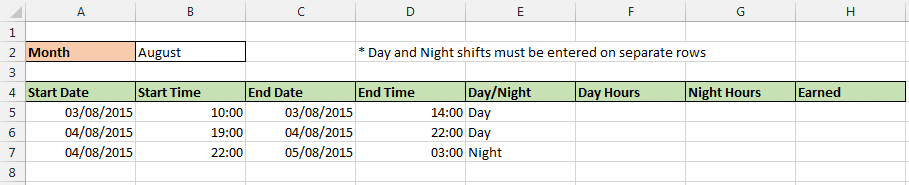
In this timesheet, the day and night shifts are entered on separate rows. This will make it easier for our calculations. A column (column E) is also used to record whether it is a day or night shift.

Excel timesheet spreadsheet

Our first task is to calculate the number of hours worked on the shift. To do this the following formula can be used. This formula finds the difference between the two times as a decimal, and then multiplies by 24 to convert it to hours.

(D5-B5)*24

If the shift is worked overnight, so you started work on one day but finished the next, then the formula below is used.

(1+D5-B5)*24

Now in this timesheet it is not quite that straight forward. We need to test first what shift they are doing and whether it was worked overnight or not, so that the correct formula can be run.

The formula below is entered into column F to calculate hours worked on the day shift.

=IF(E5="Day",(D5-B5)*24,0)

In column G, the formula below was used to calculate hours worked on the night shift. The IF function first tests if it was a night shift, then test to see if it was worked overnight (A5<C5), and runs the correct calculation as a result.

=IF(E5="Night",IF(A5<C5,(1+D5-B5)*24,(D5-B5)*24),0)
[Read more…] about Excel Timesheet with Different Rates for Shift Work

5 Cool COUNTIF Function Examples

The COUNTIF function is one of the most useful functions in Excel. Its job is to provide conditional counting. This is primarily used for analysing data and producing aggregates for reports and dashboards. However, there are many cool COUNTIF function examples in Excel

In this blog post, we will look into 5 more unorthodox but useful scenarios for the COUNTIF function to be used. The 5 COUNTIF function examples we look at are;

  1. Prevent duplicates in a range.
  2. Uniquely rank items in a list.
  3. Count the unique entries in a list.
  4. Compare two lists.
  5. Identify names that occur 3 times or more.
[Read more…] about 5 Cool COUNTIF Function Examples
  • « Go to Previous Page
  • Page 1
  • Interim pages omitted …
  • Page 11
  • Page 12
  • Page 13
  • Page 14
  • Page 15
  • Interim pages omitted …
  • Page 19
  • Go to Next Page »

Primary Sidebar

Recent Posts

  • Excel SWITCH Function – Nested IF Function Alternative
  • Sum Formulas Only in Excel
  • How to Calculate Age in Excel
  • Custom Sort in Excel
  • Case Sensitive Lookup with XLOOKUP in Excel
Advanced Excel Success book

Footer

Contact

[email protected]

LinkedIn Twitter YouTube

Useful Links

  • Home
  • Excel Online Courses
  • Tutorials
  • Sitemap
  • Privacy Policy
  • Jobs by Jooble

Course Topics

  • Blog
  • Charts
  • Courses
  • Dashboards
  • Downloads
  • Excel Tips
  • Formulas
  • Mail Merge
  • Office
  • PivotTables
  • Power BI
  • Power Pivot
  • Power Query
  • VBA

Join Our Mailing List

© Copyright 2009 Computergaga · All Rights Reserved ·


