• Skip to main content
  • Skip to primary sidebar
  • Skip to footer

Microsoft Excel Tips and Tricks - Computergaga

  • Home
  • Excel Online Courses
  • Excel Functions List
  • Free Downloads
  • Blog
  • Tutorials
  • About
Home / Archives for Formulas

TEXTSPLIT in Excel: 9 Practical Examples You Can Use Today

If you’ve ever extracted from messy text strings, you’ve probably spent far too much time wrestling with LEFT, MID, RIGHT, and FIND formulas.

TEXTSPLIT changes all of that.

Instead of performing formula gymnastics with the likes of MID and FIND, TEXTSPLIT can instantly convert a text string into a dynamic array that Excel can work with. Due to this, TEXTSPLIT has become one of the most useful text functions in modern Excel.

In this article, we’ll explore practical examples that show how TEXTSPLIT can simplify text manipulation and unlock more powerful dynamic array solutions.

[Read more…] about TEXTSPLIT in Excel: 9 Practical Examples You Can Use Today
Create Custom In-Cell Bar Charts in Excel

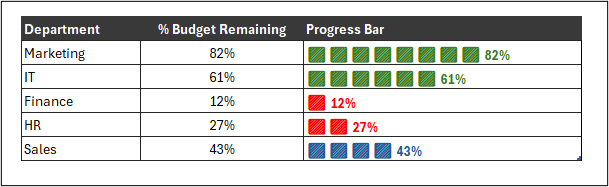
In Excel, it is possible to create a quick and effective visual that offers more flexibility than a traditional chart. With a clever combination of symbols, the REPT function, and a little formatting magic, you can build compact in-cell bar charts that are dynamic and informative.

In this article, we will create a bar chart inside a cell, colour it based on custom performance thresholds and add values as data labels.

Let’s create the following dynamic bar chart without relying on standard chart tools.

Excel progress bars created using the REPT function
[Read more…] about Create Custom In-Cell Bar Charts in Excel

Excel SWITCH Function – Nested IF Function Alternative

The Excel SWITCH function is a neat alternative to nested IF functions or the IFS function.

It is a useful substitute and a real timesaver compared to complex nested IF formulas. It is more compact and easier to read.

Watch the Video

SWITCH Function Syntax

The SWITCH function compares a value (known as the expression) against a list of values, and returns the result for the first matching value. If a match is not found, a default result can be returned.

=SWITCH(expression, value1, result1, [default_or_value2, result2])

Expression: is the value to be tested against the list of values. This is typically a reference to a cell value such as A2.

Value1: is the first value (SWITCH can evaluate up to 126 values) to be compared against the expression.

Result1: is the action to perform if its corresponding value is a match to the expression.

Default: This optional default value provides SWITCH with an else argument. This is the result to return if there is no match found.

Let’s see some SWITCH function examples.

[Read more…] about Excel SWITCH Function – Nested IF Function Alternative

Sum Formulas Only in Excel

A unique use case for summing values, could be to sum formulas only in Excel.

The SUM function will sum all numeric values in a given range, but you may have a range interspersed with other formulas that calculate subtotals or perform conditional calculations.

So, how do you only sum the cells that contain formulas. Let’s find out.

Watch the Video – Sum Formulas Only

[Read more…] about Sum Formulas Only in Excel

How to Calculate Age in Excel

There are a few methods to calculate age in Excel using formulas. In this tutorial, we will explain how to calculate age in Excel in years from a date of birth.

The formulas detailed can be used to return the difference between two specified dates for other reasons, such as length of service at an organisation, or the difference between two business transaction dates.

Download the calculate age sample file to practise.

How to Calculate Age in Excel?

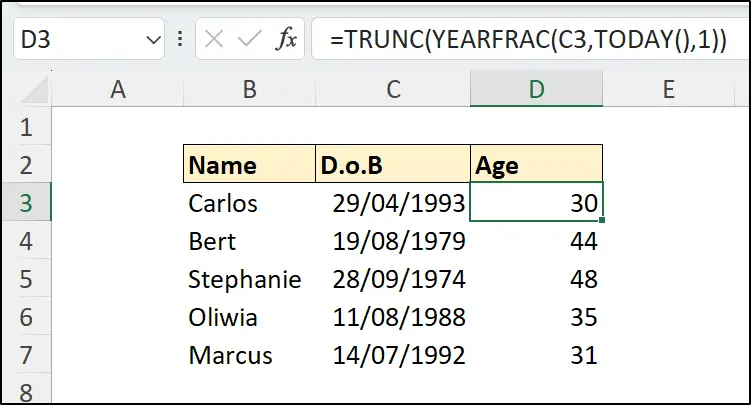
Let’s get straight into this. The easiest way to calculate age in Excel is to use the method shown in this shorts video. It uses the TRUNC and YEARFRAC functions in a simple age formula.

The formula returns the difference between the date of birth and the current date in years.

=TRUNC(YEARFRAC(C3,TODAY(),1))
Simple age formula in Excel
[Read more…] about How to Calculate Age in Excel
  • Page 1
  • Page 2
  • Page 3
  • Interim pages omitted …
  • Page 20
  • Go to Next Page »

Primary Sidebar

Recent Posts

  • TEXTSPLIT in Excel: 9 Practical Examples You Can Use Today

  • Create Custom In-Cell Bar Charts in Excel
  • Excel SWITCH Function – Nested IF Function Alternative
  • Sum Formulas Only in Excel
  • How to Calculate Age in Excel
Advanced Excel Success book

Footer

Contact

[email protected]

LinkedIn Twitter YouTube

Useful Links

  • Home
  • Excel Online Courses
  • Tutorials
  • Sitemap
  • Privacy Policy
  • Jobs by Jooble

Course Topics

  • Blog
  • Charts
  • Courses
  • Dashboards
  • Downloads
  • Excel Tips
  • Formulas
  • Mail Merge
  • Office
  • PivotTables
  • Power BI
  • Power Pivot
  • Power Query
  • VBA

Join Our Mailing List

© Copyright 2009 Computergaga · All Rights Reserved ·

