The Excel WEEKDAY function returns the day of the week corresponding to a specified date. The day is retuned as a number from 1 to 7.
The syntax for the WEEKDAY function is:
=WEEKDAY(serial_number, [return_type])
| Argument | Purpose |
|---|---|
| Serial_number | The date of the day you are trying to find |
| Return_type | The type of value you want returned. This is optional and if omitted, Excel assumes 1.1 – Returns a number from 1 (Sunday) to 7 (Saturday)2 – Returns a number from 1 (Monday) to 7 (Sunday)3 – Returns a number from 0 (Monday) to 6 (Sunday) |
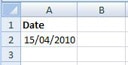
The examples below demonstrate the WEEKDAY function being used to calculate the day of the week for the date in the spreadsheet.
The 15 April 2010 is a Thursday.
| Function | Result |
|---|---|
| =WEEKDAY(A2) | 5 |
| =WEEKDAY(A2,2) | 4 |
| =WEEKDAY(A2,3) | 3 |


