The Excel SUBSTITUTE function is used to replace existing characters with a different set of characters.
The syntax for the SUBSTITUTE function is:
= SUBSTITUTE (text, old text, new_text, [instance_num])
| Argument | Purpose |
|---|---|
| Text | The text or cell reference containing the text with the characters you want to change |
| Old_textm | The existing characters you want to replace. |
| New_text | The new characters to replace the old ones with |
| Instance_num | This argument is optional. It is the number of instances of the old_text that you want to replaceIf omitted, then every instance of old_text is replaced with the new_text |
The examples below show the SUBSTITUTE function being used change the characters of an existing cell.
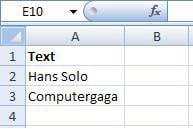
| Function | Result |
|---|---|
| =SUBSTITUTE(A2,”Solo”,”Duo”) | Hans Duo |
| =SUBSTITUTE(A3,”g”,”b”,1) | Computerbaga |
| =SUBSTITUTE(A3,”g”,”n”) | Computernana |


