The Excel LARGE function is used to return a value dependent upon its ranking in a range of values. For example, the LARGE function can be used to return the 2nd or 3rd largest number from a range.
The syntax for the LARGE function is:
=LARGE(array,k)
| Argument | Purpose |
|---|---|
| Array | the range of cells you want to find the k-th largest value in |
| K | The position in the range of numbers, from the largest, that you want to return |
The example below shows the LARGE function being used to select values from a range.
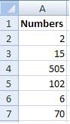
| Function | Result |
|---|---|
| =LARGE(A2:A11,2) | 102 |
| =LARGE(A2:A11,5) | 6 |
| =LARGE(A2:A11,1) | 505 |


